
Troubleshoot hunts
Find out why a hunt didn't run or didn't finish: no_coverage, budget_exhausted, an unavailable server runner, a run waiting for a runner, reasoning effort, and missing reviews.
Use these checks to find out why a hunt didn't run, didn't finish, or didn't escalate. Start with the run: open the hunt, click the run in Sweeps, and read its outcome, its note, its sources, and its steps. A skipped or failed step shows why.
Need help? Contact support with the hunt ID, the run ID, and the time with time zone.
A run ends with no_coverage
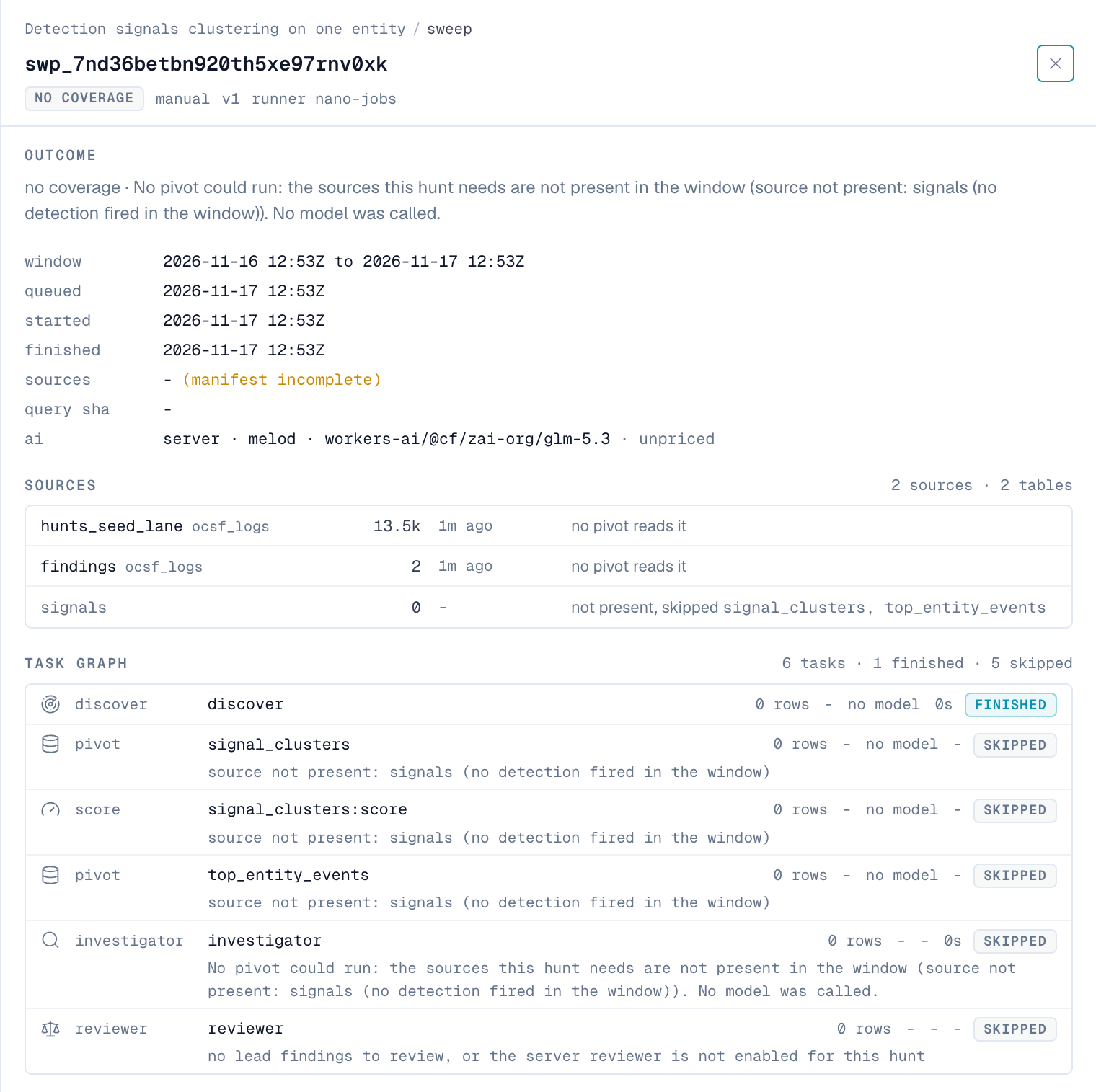
Symptom: The outcome is no coverage, with a note such as "No pivot could run: the sources this hunt needs are not present in the window".
Cause: None of the hunt's sources had data in the time window, so nano skipped every query. No AI was used, and the run cost nothing.
Fix:
- In the run's Sources table, find the source each skipped query needs.
- If the source should have data, check its ingestion in Health.
- If a query names the wrong source, correct its source types or its
source_typefilter in the playbook. - If the query reads detections, no detection fired in the window. That's a valid, quiet result.
A run ends with budget_exhausted
Symptom: The outcome is budget exhausted, with a note that names the budget. For example: "Stopped at the AI token budget: 97104 of 120000 tokens used".
Cause: The run reached a budget and stopped. The findings it filed are kept and reviewed as usual.
Fix:
- Check the run's Budget bars to see which budget ran out.
- If it's AI tokens, return fewer rows and fields from each query, or raise
budget_max_ai_tokens. See Set budgets. - If it's run time on the server, note that one server run can last at most 3,480 seconds.
- If the run used many tokens but ran few queries, see The investigator uses its budget without running queries.
The server runner is unavailable
Symptom: On Hunts → Runners, the server runner shows as unavailable with a reason. Server runs wait in the queue.
Fix: Find the reason in this table.
| Reason starts with | Fix |
|---|---|
| "No AI provider is configured" | Configure a provider in Settings → AI & pivt. |
| "the Hunt investigator agent's model (…) does not support tool calling" | In Settings → AI & pivt → Agent Models, assign the investigator a model that supports tool calling. |
| "the Hunt investigator agent is unavailable" | Check the investigator's provider and model. |
| "the AI agent configuration is not loaded yet" | Wait a minute after the service starts. If it doesn't clear, check the jobs service logs. |
| "this process cannot mint hunts Agent Lane tokens" | The jobs service is missing its ClickHouse administrator credentials. Check its ClickHouse settings. |
| "could not mint the hunts Agent Lane token" | nano couldn't create the runner's database user. Check ClickHouse health and NANO_HUNTS_AGENTLANE_MAX_TOKENS. |
| "the server hunt runner is switched off" | Remove NANO_HUNTS_SERVER_RUNNER=off from the jobs service. |
| "the license hard stop suspends the hunts lane" | Renew your license. |
| "no ClickHouse URL" | Set NANO_HUNTS_LANE_URL or CLICKHOUSE_URL on the jobs service. |
If no server runner is listed at all, check that the jobs service is running the Self-run image.
If a run's note starts with "Not run:", the runner couldn't start it. For example, "Not run: the monthly AI credit limit has been reached."
A run is waiting for a runner
Symptom: The run stays at "waiting for a runner".
Cause: No runner of the right kind is online. A hunt set to desktop waits for nano Desktop. A hunt set to server waits for the server runner.
Fix:
- Click Hunts, then Runners.
- Check for an online runner of the right kind.
- If the server runner is unavailable, see The server runner is unavailable.
- To move the hunt to the other runner, change its
runner_kind. See Choose where a hunt runs.
A run shown as "orphaned" was started by a runner that stopped responding. After a timeout, nano ends it as error, and the next run can start.
The investigator uses its budget without running queries
Symptom: Runs end as budget_exhausted or with no findings. The run lists few or no queries, but the investigator used many tokens.
Cause: The model spends its output on reasoning instead of running queries. Reasoning models can do this at default effort.
Fix:
- Set the hunt agents' reasoning effort to
low. See Reasoning effort. - If it still happens, choose an investigator model with reliable tool calling.
A hunt is held
Symptom: The hunt shows held, or a run's outcome is held · source unhealthy.
Cause: A source the hunt requires has no live data. nano holds the hunt instead of reporting a clean result over missing data.
Fix: Check the hunt's Telemetry panel for the reason, then check the source's ingestion in Health.
Leads aren't reviewed
Symptom: Findings stay leads, and the Reviewer verdict panel is empty.
Fix:
- On the hunt's Escalation card, check that Review this hunt's findings with the server AI reviewer is selected. It's off by default for Desktop hunts.
- For a Desktop hunt, wait 10 minutes after the run ends.
- Check that the server runner is online, and that the reviewer has a model that supports tool calling.
- If a review failed, click Re-review on the finding.
The reviewer escalated, but the finding is still a lead
The Reviewer verdict panel shows why:
| Message | Meaning |
|---|---|
| "escalation without verified citations" | The reviewer cited an event it didn't read, or none of the finding's own events. See How the reviewer decides. |
| A severity rule, such as "medium needs high confidence (>= 0.8)" | The escalation didn't meet the escalation bar. |
| "internet-facing attempt with no evidence of success" | nano suggested the finding for a campaign instead. |
nano refuses case mode
Symptom: When you choose case, the Escalation card shows "Refused" and the reviewer's numbers.
Cause: The reviewer doesn't yet have the track record the case gate needs.
Fix: Keep the hunt on notify. Acknowledge its escalations and close their cases, so nano can measure the reviewer. If you changed the reviewer's model, its record starts again.
A run shows unpriced
The model has no price, so nano can't estimate the cost. The token counts are still recorded. See Model prices.
An analyst can't see a finding
The Hunts pages follow each analyst's source visibility. If a finding's events come from a source the analyst can't see, the finding is hidden from them.