
Hunt concepts
Learn the parts of a hunt: playbooks, queries, source discovery, findings, the investigator and the reviewer, memory, rulings, and campaigns.
Learn the parts of a hunt before you write or tune one. Each term on the Hunts pages is explained below.
Playbooks
A hunt's playbook says what the hunt tests and how. It has these parts:
| Part | What it is |
|---|---|
| Hypothesis | One or two sentences that say what the hunt believes and what would rule it out. Up to 4,000 characters. |
| Pivots | Up to 12 queries that nano runs on every sweep. No AI is involved. |
| Risk weight | A number from 1 to 10 (default 5). Among hunts that are due, higher runs first. |
| Default severity | critical, high, medium (default), low, or info. The reviewer can raise a finding's severity, but never lower it. |
| Escalation mode | off, notify (default), or case. See Escalation. |
| Readout | Whether escalations of this hunt need a plain-English summary. |
Here is an example hypothesis: "A macro document that starts PowerShell with an encoded command is the first stage of an intrusion. Patch management also runs encoded PowerShell every day, so the parent process and the history of the host decide it."
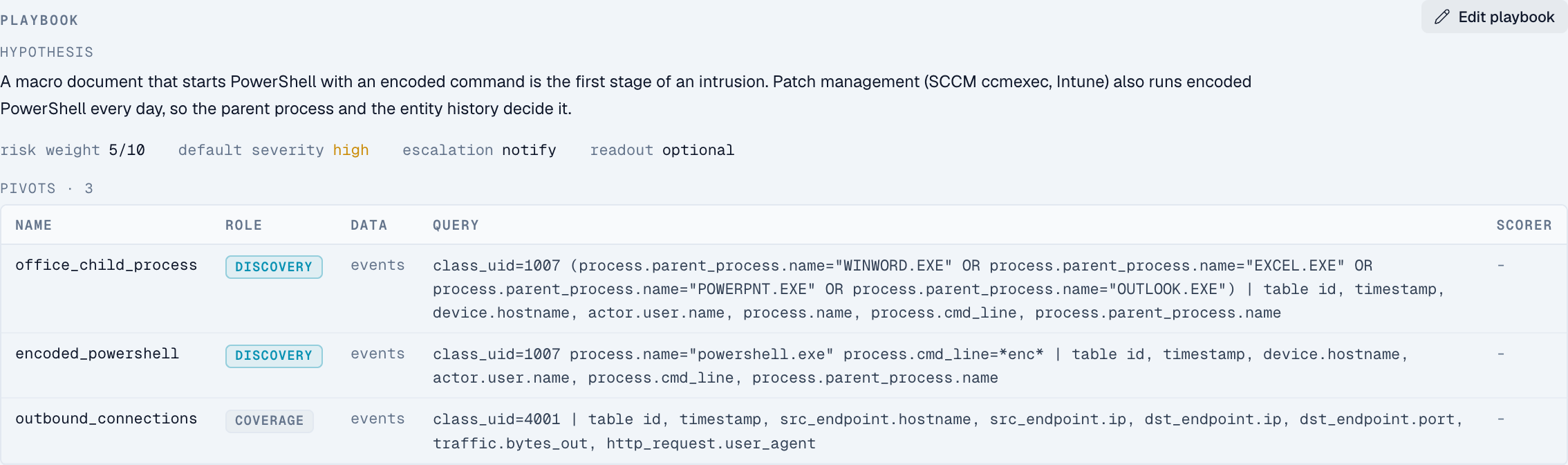
Pivots
A pivot is one query in the playbook. Each pivot has a role:
- Discovery pivots find candidates for the investigator. These are the rows that might be the attack.
- Coverage pivots measure the normal activity around them. For example, a count of all outbound connections shows how much normal traffic surrounds a rare one.
Each pivot reads one dataset:
- Events (the default): an nPL query over your events. nano adds the sweep's time range.
- Signals: one SQL
SELECTover detections that already fired. Use it for questions nPL can't express.
A pivot can list the source types it needs. If it doesn't, nano reads them from a source_type filter in the query. A pivot with neither runs on any source.
Scorers
A scorer flags unusual rows in a pivot's results. It doesn't use AI.
| Method | Flags rows where |
|---|---|
zscore | The value is more than the threshold number of standard deviations from the average |
iqr | The value is outside the normal range, widened by the threshold |
rare | The value appears no more than the threshold number of times |
Hunts created before v2.0.32
Older hunts have no pivots. nano runs their original query as one discovery pivot named primary. The hypothesis comes from the hunt's subtitle or description. The playbook shows v1 until you add pivots.
Source discovery
Each sweep starts by checking which log sources have data in its time window. This step is called discover, and it doesn't use AI. The result, the source inventory, lists each source type with its event count, when it was first and last seen, and which fields it fills in. The AI agents see this list first and use only the sources on it.
If a pivot's sources have no data, nano skips that pivot. It doesn't run and it costs nothing. If nano skips every pivot, the sweep ends as no_coverage without calling an AI model. See Troubleshoot hunts.
Sweeps
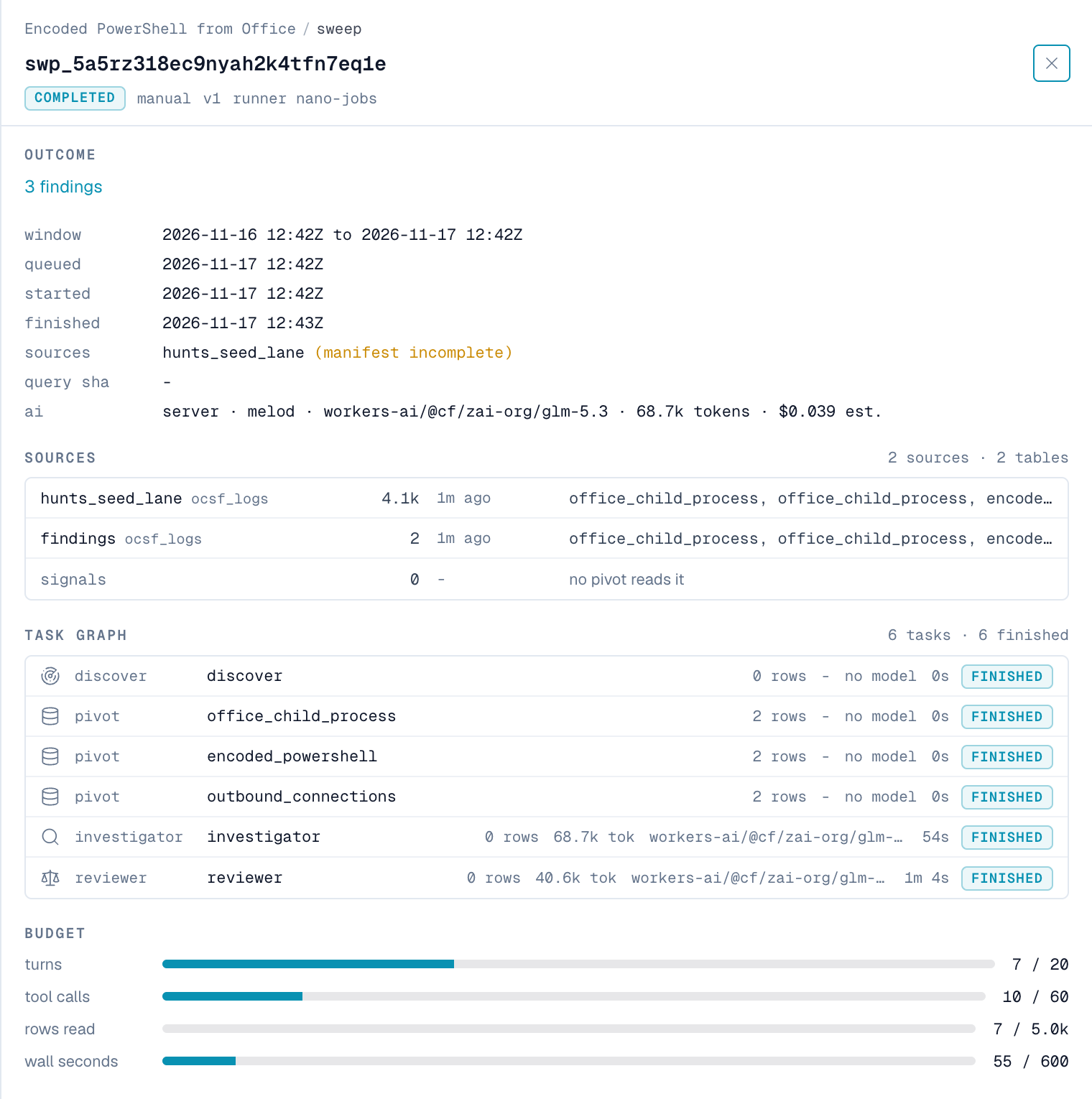
A sweep is one run of a hunt over one time window. By default, the window is the last 24 hours. To see a sweep, open the hunt and click it in Sweeps. The sweep shows:
- the sources it found;
- each step it ran, with the rows and AI tokens each step used;
- how much of its budget it used;
- every query it ran.
Findings
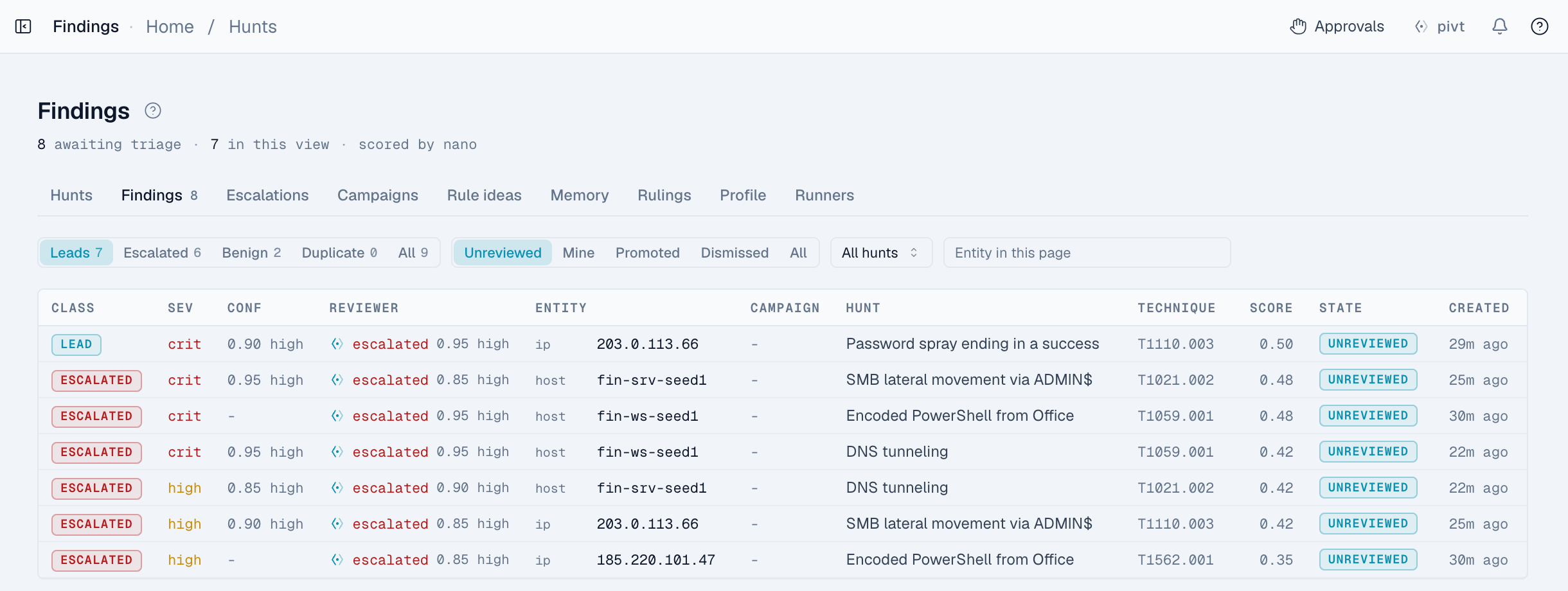
The investigator files every candidate it looks at as a finding, not only the suspicious ones. Each finding has one of these labels:
| Label | Meaning | Set by |
|---|---|---|
lead | The investigator couldn't rule it out. It waits for the reviewer and an analyst. | Investigator, or reviewer |
benign | It was tested against its most likely harmless explanation, and that explanation held. | Investigator, or reviewer |
duplicate | It matched something already known: a suppression, a baseline, an earlier finding, or a detection that already fired. | Investigator |
escalated | The reviewer escalated it, and it met the escalation bar. | Reviewer only |
The Findings page opens on Leads, which shows leads and escalated findings. Click Benign, Duplicate, or All to see what the hunt filtered out and why.
To act on a finding, open it and click one of these:
- Promote to case: opens a new case for the finding.
- Dismiss: records why you dismissed it and adds a suppression. You choose whether the suppression applies to this hunt or every hunt, and whether it lasts 30 days, 90 days, or never expires.
- File under campaign: links the finding to a known attacker.
- Open in Search: opens the evidence events in Search.
The investigator and the reviewer
Two AI agents look at each sweep. They have different jobs, and you can assign each one its own model.
The investigator:
- Reads what earlier runs and your analysts recorded: suppressions, baselines, notes, the last 30 days of findings, rulings, and known attackers.
- Reads the pivot results and the detections that fired on the same hosts, users, and IPs.
- Runs more read-only queries if it needs them, within the sweep's budget.
- Tests each candidate against its most likely harmless explanation.
- Labels each candidate
lead,benign, orduplicate. - Records what it learned, with the evidence for it.
The investigator can't escalate a finding.
The reviewer checks each lead separately:
- It reads the claim and the evidence events. It doesn't see the investigator's reasoning yet.
- It checks how common the activity is, the host or user's last 14 days, known-good activity, related alerts, and earlier decisions about the same host or user.
- It records a verdict,
escalatedorbenign, with its confidence and the events it relied on. - Only then can it read the investigator's reasoning. It can change its verdict once. nano keeps both verdicts.
nano checks each verdict before it applies it. The reviewer must cite events it actually read, including at least one of the finding's own events. If it doesn't, the finding stays a lead. An escalation must also meet the escalation bar.
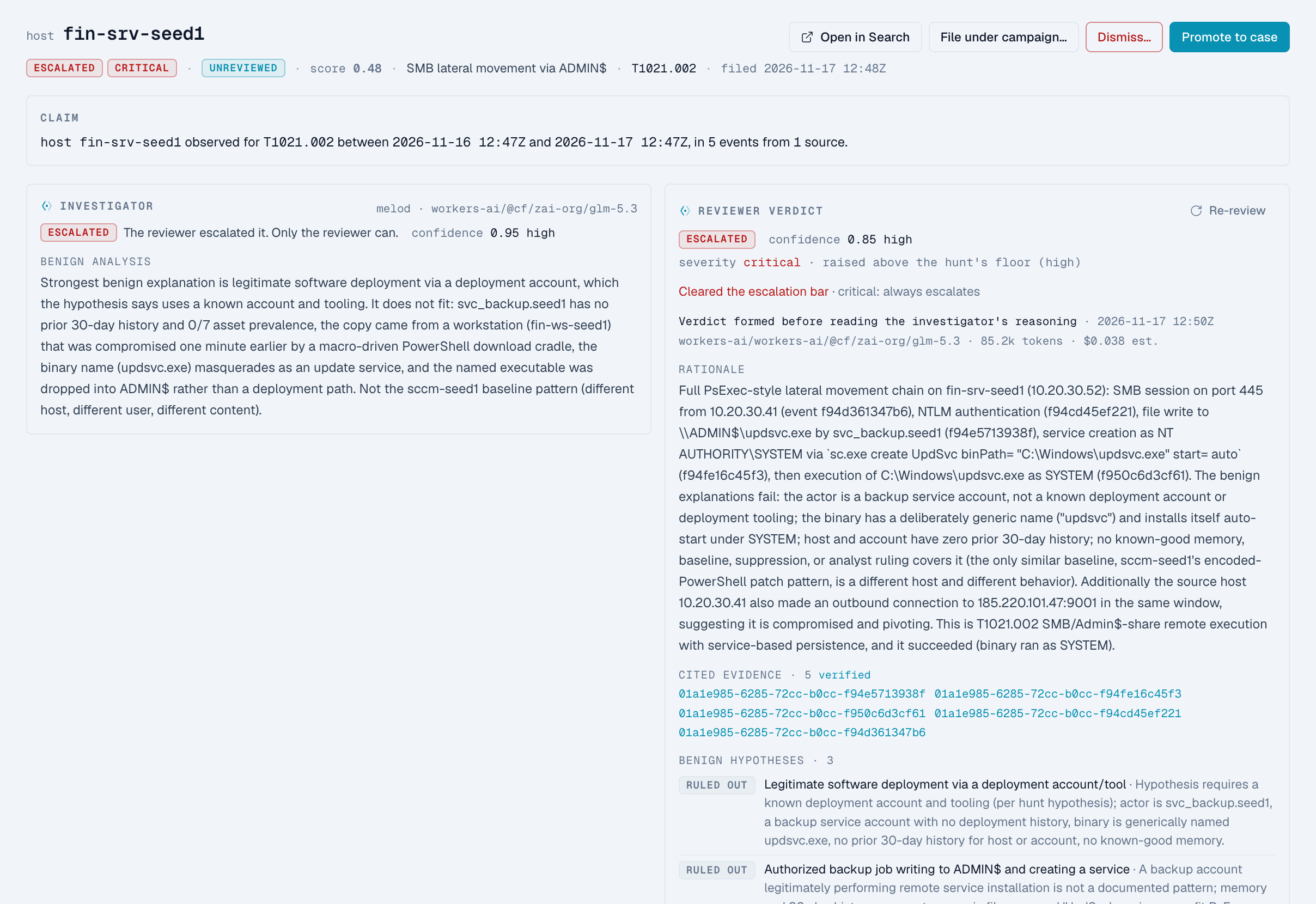
If a review fails, the finding stays a lead. To review it again, click Re-review. You need hunts:manage.
Memory
Hunts learn from earlier runs. What they learn is called memory, and you can review it on the Memory page.
| Type | What it holds | Applies to | Written by |
|---|---|---|---|
| Baselines | Normal behavior of one host, user, or IP, such as known automation | One host, user, or IP | Investigator or analyst |
| Hunt notes | Tips and known false positives for one hunt | One hunt | Investigator or analyst |
| Environment notes | Facts that apply to every hunt | Every hunt | Investigator or analyst |
| Suppressions | A harmless pattern that repeats | One hunt, or every hunt | Analyst, or investigator |
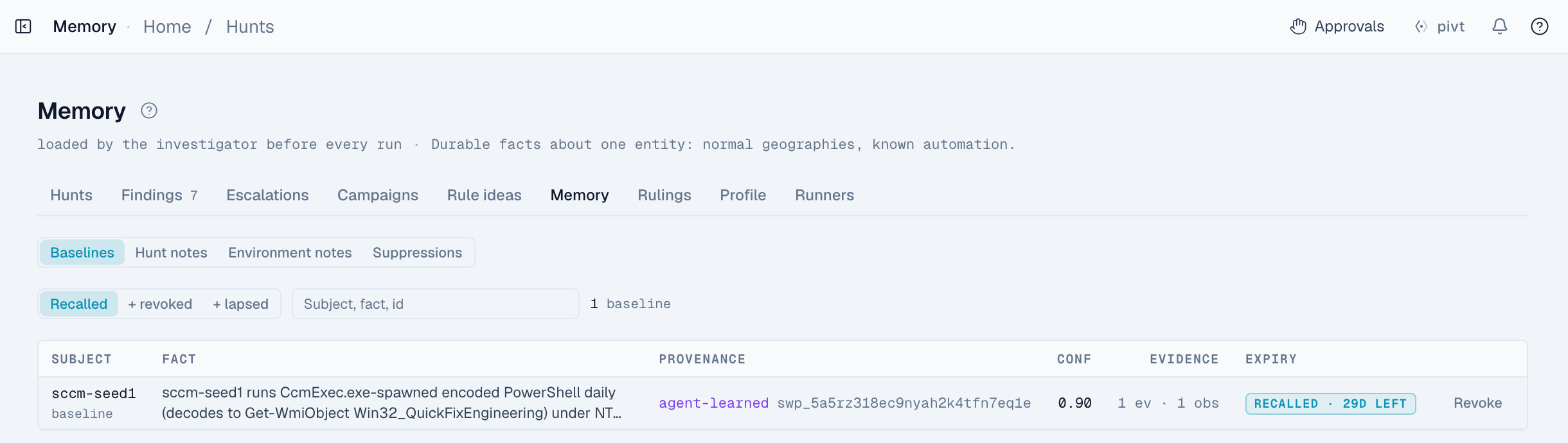
Each row shows who wrote it, how confident they were, the evidence, and when it expires. To stop a row being used, click Revoke. nano keeps revoked rows so a later run can't learn the same thing again.
These rules stop an AI agent from hiding real activity:
- A suppression that the investigator writes lasts at most 30 days.
- The investigator can only write a suppression for a pattern it labeled benign in the same run.
- A suppression that stops matching for 60 days expires early.
- A finding that an investigator's suppression marks as a duplicate still appears on the Findings page, under Suppressed by the agent. Only an analyst's suppression hides a finding from the default view.
Rulings
A ruling is an analyst's decision about a finding: true_positive, false_positive, benign, duplicate, or not_actionable. nano records a ruling when you:
- dismiss a finding;
- close the case that a finding was promoted to;
- acknowledge an escalation;
- record a ruling on the finding by hand.
Every later run reads the 50 most recent rulings for its hunt. The reviewer also reads the 20 most recent rulings about the same host, user, or IP. Rulings also measure how accurate the reviewer is. See The case gate.
Campaigns
A campaign tracks one known attacker. It has a name, other names the attacker uses, a description, and up to 8 trip conditions. A trip condition is a query that would show the attacker is back.
| Behavior | What happens |
|---|---|
| Recheck | Each sweep of a linked hunt checks the campaign when it's due. By default that's every 24 hours. If the trip conditions return no rows, the result is quiet, with no AI call. Otherwise a small AI model decides whether they fired. |
| Fired | nano files a finding linked to the campaign. The reviewer checks it like any other lead. |
| Dormant | Two quiet rechecks in a row make the campaign dormant. After 90 days dormant, nano closes it. |
| Attempts on internet-facing systems | An attack attempt on an internet-facing system, with no sign that it succeeded, stays a lead and is suggested for a campaign. Scanning doesn't page anyone. |
| Suggested campaigns | The investigator can suggest a new campaign. It starts dormant and does nothing until an analyst activates it. |
To link a campaign to a hunt, open the campaign. Active campaigns raise the hunt's priority.
Detections in hunts
Hunts use your detection rules as evidence:
- After each events pivot, the investigator sees the detections that fired on the same hosts, users, and IPs.
- If a detection already covers a finding, the finding is labeled a duplicate and names the rule.
- The reviewer sees recent detections on the finding's host, user, or IP.
- The built-in template Detection signals clustering on one entity looks for several different quiet detections firing on the same host, user, or IP.
Rule ideas
When analysts keep promoting the same kind of finding, nano suggests it under Rule ideas. nano suggests an idea only after the pattern appears in 3 sweeps and analysts promote it twice. Click Send to record that you took it to detection as code, or Reject to keep hunting for it instead. A hunt never writes a detection rule itself. Both actions need hunts:manage.
What's next
Hunts
Run scheduled threat hunts that test a hypothesis against your data, rule out benign explanations, and send analysts only the findings that hold up.
Escalation
Control how hunt findings reach your analysts: the escalation bar, the off, notify, and case modes, the case gate, notifications, and acknowledgement.