
Hunts
Run scheduled threat hunts that test a hypothesis against your data, rule out benign explanations, and send analysts only the findings that hold up.
Use hunts to look for attacks that your detection rules don't catch. A hunt tests a hypothesis against your data on a schedule. Two AI agents then sort what it finds, so your analysts see only the findings that hold up.
How a hunt differs from a detection rule
A detection rule asks whether a known pattern happened. A hunt asks whether a hypothesis is true anywhere in your data, and it looks at the benign explanations before it asks for a person.
| Detection rule | Hunt | |
|---|---|---|
| Question | Did this known pattern happen? | Is this hypothesis true anywhere in my data? |
| Logic | One query with a match condition | A hypothesis, several queries, and AI review |
| Output | An alert for every match | Findings, each labeled lead, benign, duplicate, or escalated |
| Benign activity | You add exclusions | The hunt tests each candidate against a benign explanation and remembers what it learns |
| What reaches an analyst | Every alert | Only escalated findings |
| Cost | Query cost | Query cost plus AI tokens on every run |
Hunts and detection rules work together. A hunt reads the detections that already fired, including quiet ones from rules in Live mode. If a detection already covers what a hunt finds, the hunt labels its finding a duplicate. If a hunt keeps finding the same real pattern, you can turn it into a detection rule.
How a hunt runs
Each run of a hunt is called a sweep. A sweep runs these steps in order:
- Schedule. nano picks the hunts that are due, highest priority first.
- Discover sources. nano checks which log sources have data in the time window. If none of the hunt's sources have data, the sweep stops here at no AI cost.
- Run queries. nano runs the hunt's queries and flags unusual rows. This step doesn't use AI.
- Recheck known actors. If the hunt tracks known attackers, a small AI model checks whether their warning signs appeared.
- Investigator. An AI agent reads the results and your team's notes, runs more queries if it needs to, and labels each candidate. The investigator can't escalate.
- Reviewer. A second AI agent checks each lead on its own, from the evidence. The reviewer is the only step that can escalate a finding.
- Analyst. A person acknowledges the escalation, opens a case, or dismisses the finding. Later runs learn from that decision.
Each layer decides one thing:
| Layer | Decided by | What it decides |
|---|---|---|
| Query rules | nano | Queries are read-only and limited. The investigator can't escalate. |
| Recheck | Small AI model | Whether a known attacker's warning signs appeared |
| Investigator | AI agent | Whether each candidate is a lead, benign, or a duplicate |
| Reviewer | AI agent | Whether each lead is escalated or benign |
| Analyst | Person | The final decision, which later runs learn from |
Find hunts in nano
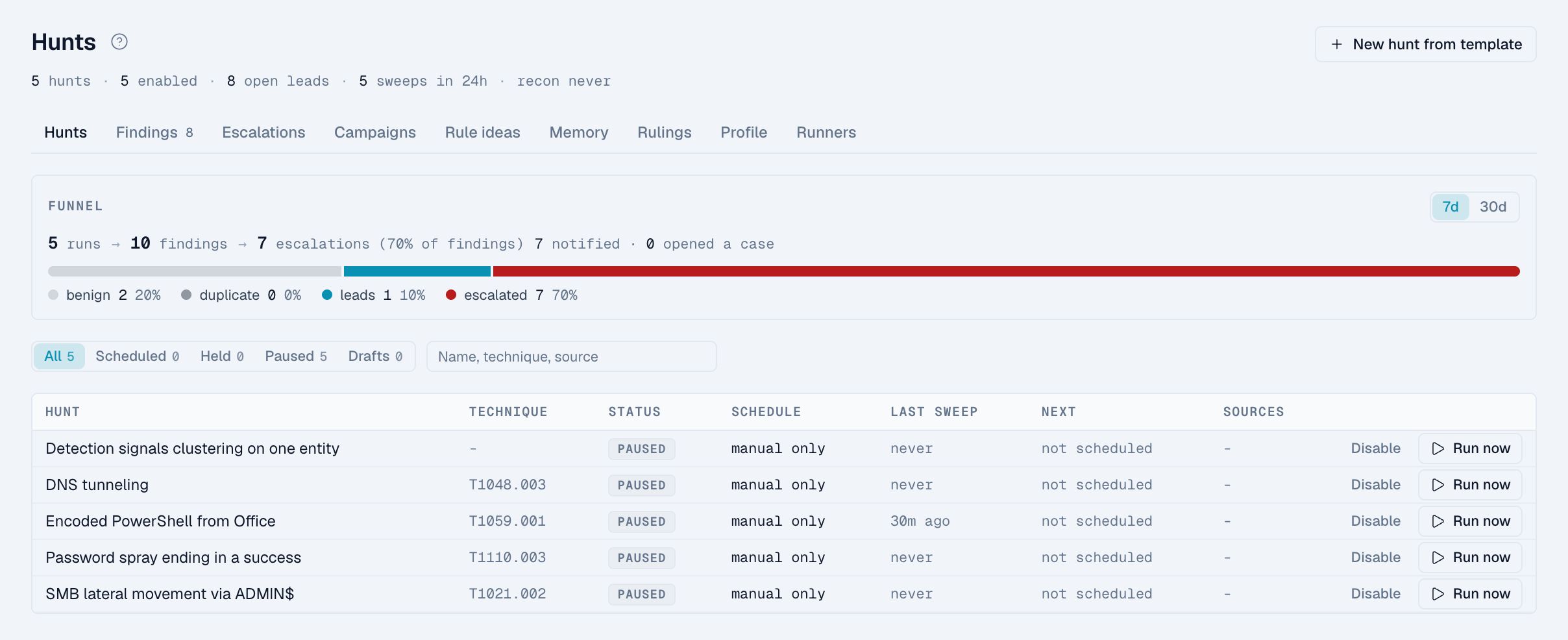
Click Hunts in the left navigation. The section has these pages:
| Page | Use it to |
|---|---|
| Hunts | See the funnel and your hunts. Open a hunt to see its playbook, escalation settings, and runs. |
| Findings | Triage findings by label, state, and hunt. |
| Escalations | Acknowledge findings the reviewer escalated. |
| Campaigns | Track known attackers and their warning signs. |
| Rule ideas | Review detection rules suggested by repeated findings. |
| Memory | Review what hunts have learned about your environment. |
| Rulings | See your analysts' decisions on findings. |
| Profile | See which telemetry you have and which techniques it can cover. |
| Runners | Check the runners that run your hunts. |
Read the funnel
The funnel on the Hunts page, and on each hunt, counts runs, then findings by label, then escalations, over 7 or 30 days. A healthy hunt files many findings and escalates very few. In a production deployment of the same design at about 23 TB per day, one week of 1,248 runs escalated 86 findings. That is well under 1% of the findings filed.
