
Cost and budgets
Understand what hunts cost in AI tokens, see the cost of each run, and limit spending with budgets, schedules, and model choice.
Plan for hunts to use a lot of AI. They are expensive by design: on every run, the investigator reads results and runs queries, and the reviewer checks each lead again on its own. Your cost depends on the model, how much data the hunt reads, and its budgets.
What a run costs
These costs were measured with the built-in AI model, glm-5.3 on Cloudflare Workers AI, at its list prices: $1.40 for each million input tokens, $4.40 for each million output tokens, and $0.26 for each million cached input tokens.
| What | Typical cost |
|---|---|
| One investigator run | $0.08 to $0.29, usually about $0.25 |
| Reviewing one finding | About $0.10 to $0.13 |
| One run plus its reviews | Usually $0.30 to $0.70 |
| An evaluation of 18 past findings | About $0.02 |
| Campaign rechecks, on the fast model | Under $0.03 |
These are upper estimates. The measurements counted cached input at the full price, so real bills with caching are lower.
With the default budgets, one run can't spend more than these amounts:
| What | Most it can cost |
|---|---|
| The investigator | About $0.80 |
| All reviews in the run | About $1.50 |
| One run in total | About $2.30 |
On the fast model, glm-5.3-flash, the investigator costs about ten times less.
Your cost depends on:
| Factor | Effect |
|---|---|
| Model | Prices differ a lot between models. You can choose a different model for each agent. |
| Data | More rows in query results means more AI input. |
| Number of leads | The reviewer checks each lead separately, so more leads cost more. |
| Budgets | Budgets set the most a run can spend. |
| Schedule | A hunt that runs every 6 hours costs four times as much as a daily one. |
| Reasoning effort | Higher effort uses more AI output for each step. |
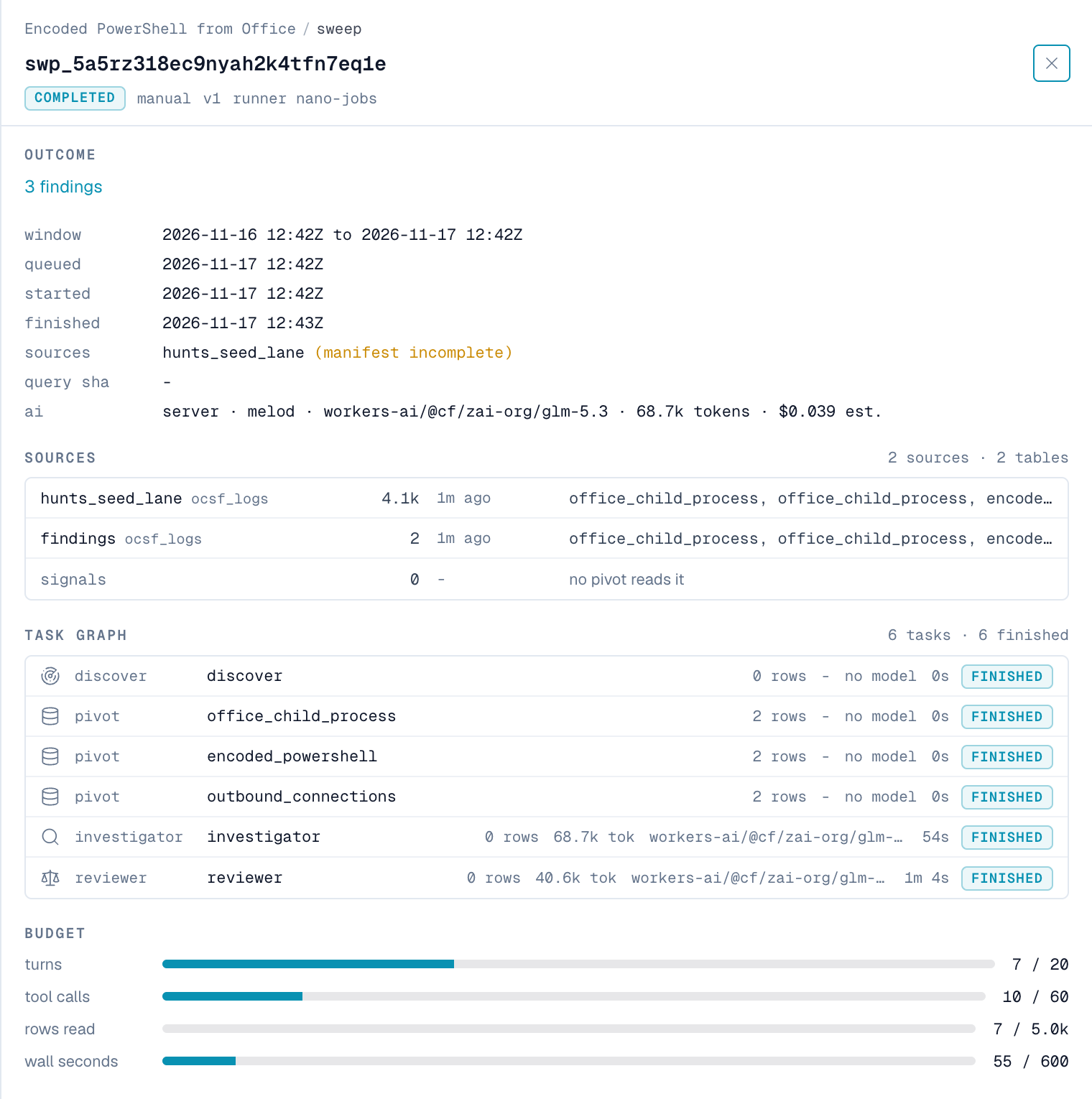
Each run and each review shows its own tokens and estimated cost. See See what a run cost.
Steps that cost nothing
These steps don't use AI:
- Source discovery, queries, and scoring.
- A run that ends as
no_coverage. - A campaign recheck whose trip conditions return no rows.
A campaign recheck that does need AI uses the small glm-5.3-flash model by default.
Evaluations
An evaluation replays past findings to the reviewer model and compares its answers with your analysts' rulings. The model gets no extra tools and doesn't see the investigator's reasoning. Each item is one short request, so an evaluation of 18 findings costs about $0.02. nano uses evaluations for the case gate.
Model prices
nano estimates cost from each model's price in the model catalog. For the built-in Workers AI models, if the catalog has no price, nano uses Cloudflare's published prices from November 2026, in US dollars for each million tokens:
| Model | Input | Cached input | Output |
|---|---|---|---|
glm-5.3 | 1.40 | 0.26 | 4.40 |
glm-5.3-flash | 0.15 | 0.03 | 0.50 |
If a model has no price, the run shows unpriced and records the token counts only. These amounts are estimates. Your AI provider's bill is the final amount.
See what a run cost
| Where | What it shows |
|---|---|
| A run, in the ai row | The investigator's model, tokens, and estimated cost |
| A run's list of steps | The tokens and model for each AI step |
| A finding, under Reviewer verdict | The model, tokens, and estimated cost of its review |
| A campaign, under Recheck history | The model and tokens for each recheck |
| Settings → AI & pivt → Usage | AI usage across nano |
To get the total for a run, add the investigator's cost to the cost of each review.
Set budgets
Budgets set the most a run can spend. These are the defaults for new hunts:
| Agent | Default budget |
|---|---|
| Investigator | 500,000 budget tokens, 60 tool calls, 40 turns, and 15 minutes for each run |
| Reviewer | 100,000 budget tokens for each finding, and at most 1,000,000 for each run |
Cached input counts as about a fifth of a token toward a budget. This changes only the budget. It doesn't change what your provider bills.
nano always keeps room for one last turn, so a run can file what it found before it stops. When a budget runs out, the run ends as budget_exhausted, keeps its findings, and notes which budget ran out.
To change a hunt's investigator budget, call the API. You need hunts:manage.
curl -X PATCH "https://<your-nano-host>/api/hunts/<hunt-id>" \
  -H "X-API-Key: $NANO_API_KEY" \
  -H "Content-Type: application/json" \
  -d '{"budget_max_ai_tokens": 250000, "budget_max_turns": 30}'
For every budget field, see Set budgets.
If your installation has a monthly AI credit limit, nano checks it before each run and each review. When the limit is reached, runs don't start, and the run notes "the monthly AI credit limit has been reached".
Reduce cost
- Use the fast model for the investigator. In Settings → AI & pivt → Agent Models, assign
glm-5.3-flashto the investigator. It costs about ten times less. - Lower the budgets. A smaller investigator budget lowers the most a run can spend.
- Use fewer pivots. Each pivot adds rows for the investigator to read.
- Keep query results small. End events queries with
| tableand only the fields you need. Add a scorer so unusual rows stand out. - List the sources each query needs. nano skips queries whose sources have no data, at no cost.
- Run hunts less often. Run high-risk hunts often. Run the rest daily or weekly.
- Keep reasoning effort low. The hunt agents use low effort by default.
- Help hunts learn. Baselines, suppressions, and rulings let the investigator rule out harmless activity early, so fewer leads need a review.
What's next
Create and edit hunts
Create a hunt from a template, write its hypothesis and queries in the playbook editor, test the queries, and change other hunt settings.
Hunt security
Understand how hunts keep AI agents read-only and limited, handle attacker-controlled log content, keep findings visible, and what data goes to your AI provider.